
FME Training Courses

Join our certified trainers who provide practical, hands-on courses that support both new and experienced users working with Safe Software’s FME platform.

FME Training with IMGS

Building Real Skills With Trusted FME Experts

IMGS delivers hands-on training designed to help organisations get real value from the FME platform. Our certified trainers bring years of industry experience across data integration, geospatial systems, and enterprise workflows.

Whether you are new to FME or looking to deepen your expertise, our courses focus on practical learning that can be applied immediately within your organisation.

Every course is designed to build confidence, strengthen technical capability, and help teams move data more efficiently across their systems.

Expert-Led, Certified Training

Upcoming FME Training Courses

Explore our latest certified training courses for FME professionals. Whether you’re just getting started or looking to expand your expertise, we’ve got something for every level.

Training Course:

Description:

FME and ArcGIS Online
May
4 x Half Days

This FME and ArcGIS Online course provides a comprehensive introduction to integrating FME with the ESRI ArcGIS suite, covering both traditional and modern GIS platforms. Participants will learn how to configure FME to work seamlessly with ArcGIS Pro, ArcGIS Online, and Portal Feature Services, including the handling of attachments.

FME and Analytics
June
4 x Half Days

This course is key for FME users intending to build data pipelines for Power BI using FME Flow and FME Form. Through hands on exercises, learn the advanced skills, that users need to know in delivering quality data for insights in Power BI. The training will introduce a no-code approach to building integration and data quality pipelines from source systems to relational databases and cloud data warehouses.

FME and AI
June
4 x Half Days

This hands-on course empowers GIS and data professionals to combine Safe Software’s FME platform with artificial intelligence (AI) tools. Learn to streamline data integration, preparation, and quality assurance while orchestrating AI-driven workflows that deliver deeper insights, automate processes and support responsible AI use within your organisation.

FME and Data Virtualisation
Date TBC
4 x Half Days

Discover how to use Safe Software’s FME Platform to power data virtualisation and API-based solutions connecting and sharing live data across systems without writing any code. Data virtualisation enables organisations to make faster, better-informed decisions, strengthen data governance and security, reduce operational costs, and improve team productivity.

FME Form

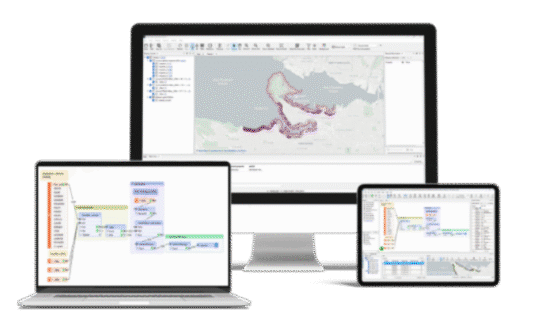
FME Form is your no-code authoring environment to give your data purpose, with all tools included, to build all your data workflows.
FME Flow

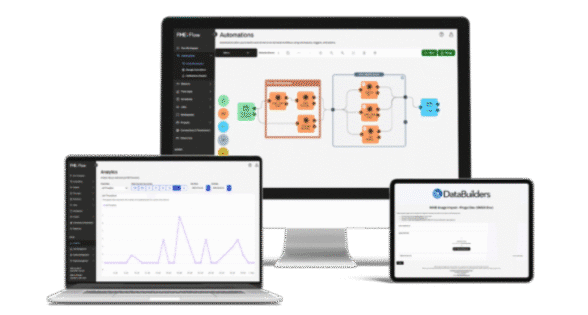
FME Flow is where you deploy your workflows and bring your data to life. Power all your solutions using automations, no-code web apps, and more.
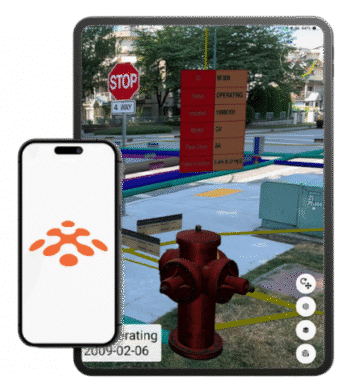
FME Realize

Extend the power of the FME Platform to spatial computing and deliver real-time insights through Augmented Reality (AR).

Why Choose Intro to FME

This beginner-level course introduces you to Safe Software’s FME, a tool that helps you to transform, and move data between systems and formats.

The course is designed for people who work with data but have never used FME before. You don’t need any programming experience, just a basic understanding of data and an interest in making your data tasks easier and faster.

Ready to Optimise Your FME Environment?

  • Understand what FME is, how it works, and how to navigate FME Form.
  • Read, inspect, transform, and write data between different formats.
  • Use tools, filters, and logic to clean, calculate, and organise data.
  • Build, document, and share clear, simple FME workflows.
  • GIS in the Irish Context.
  • Common Irish Use Cases.
  • FME Platform Overview:
    1. Navigating FME.
    2. Reading Data in FME.
    3. Inspecting Data in FME.
    4. Writing Data in FME.
    5. Transforming Data in FME.
    6. Formatting & Creating Attributes.
    7. Filtering Data.
    8. Data Calculations.
    9. Spatial Data & Joins.
    10. Best Practice.

FME Form Standard (Beginner) Training

This training builds a strong foundation for using FME Form (desktop), including extensive hands-on, problem solving exercises.

This course introduces basic concepts and terminology, to help you become an efficient user of FME, and direct you to resources which will assist you in applying the product for your own needs.

Ready to Optimise Your FME Environment?

  • Build complex translations using FME Workbench.
  • View and inspect the data using FME Viewer.
  • Apply best practices to large workspaces.
  • Manipulate data geometry and attributes with transformers.
  • Work with multiple datasets in a single workspace.
  • Create  low-maintenance, reusable workspaces.
  • Why Data Integration?
  • Connect to data.
  • Transform data.
  • Create and modify attributes.
  • Design workspaces for advanced reading and writing.
  • Use conditional values.
  • Join tables.
  • Document your workspace.
  • Debug workspace.

FME Form Advanced Training

This training course is intended for persons with some prior experience of using FME.  It builds upon the basic framework of workspace creation in FME Form.  The course covers topics commonly used by all workspace authors who wish to take their FME skills to the next level.

Ready to Optimise Your FME Environment?

  • Use Advanced parameters.
  • Improve FME Form performance.
  • Create custom transformers.
  • Optimise reading and writing for increased flexibility.
  • Apply advanced attribute handling.
  • Read from and write to multiple locations.
  • Work with multiple data models using lists.
  • Leverage ordered data.
  • Visually compare and merge workflows.
  • Design modular and maintainable workspaces with custom transformers.
  • Build a shared library of custom transformers.
  • Design for performance.
  • Optimise workspace performance.

FME Flow Training

This course is key for FME users intending to author workspaces for use on FME Flow.  Through hands on exercises, learn the advanced skills, knowledge, and terminology that users need to know in order to produce workspaces optimised for FME Flow.  The training will introduce basic concepts and terminology, help you become an efficient FME Flow user, and direct you to resources to help apply the product to your own needs.

Ready to Optimise Your FME Environment?

  • Produce workspaces optimised for FME Flow.
  • Author a variety of FME Flow Services.
  • Automate workspaces using FME Flow.
  • Create notifications.
  • Group components using FME Flow Projects.
  • Introduction to FME Flow.
  • FME Flow and data handling.
  • Self-Serve basics.
  • Real-time with FME Flow.
  • Real-time message handling.

FME & ArcGIS Online

This hands-on training course is ideal for those looking to build or strengthen their foundational skills in FME and ArcGIS Online.  Whether you’re just starting out or seeking to streamline your data integration workflows, this course will give you practical skills and industry-relevant techniques to work more efficiently.

Ready to Optimise Your FME Environment?

  • Read, write and transform data for use in ArcGIS Online.
  • Work with ArcGIS Online feature classes.
  • Automate workflows triggered by data changes.
  • Handle GeoDatabases and manage attachments effectively.
  • Apply industry best practices for FME workflow design.
  • Live, expert instructions from a Certified FME Trainer.
  • Virtual classroom access via strigo.
  • Training environment and FME license.
  • Digital manual and hands-on labs for guided practice.

FME & Reporting

This hands-on training course is designed for GIS and data professionals who want to harness the power of Safe Software’s FME to automate and enhance reporting workflows. Participants will learn how to create dynamic, data-driven reports in multiple formats including HTML, Word, Excel, and PDF, and how to deploy interactive reporting solutions using FME Flow Apps.

Ready to Optimise Your FME Environment?

  • Familiarity with FME Desktop
  • Understanding of spatial and tabular data concepts
  • Design and generate customised reports using FME.
  • Automate reporting workflows for spatial and tabular data.
  • Create interactive HTML reports and deploy them via Flow Apps.
  • Produce professional-grade Word and Excel reports.
  • Generate and format PDF documents from FME workflows.
  • Introduction to report in FME.
  • HTML reports and Flow apps.
  • Word Reports.
  • Excel Reports.
  • PDF Creation.

FME and Analytics

This course is key for FME users intending to build data pipelines for Power BI using FME Flow and FME Form. Through hands on exercises, learn the advanced skills, that users need to know in delivering quality data for insights in Power BI. The training will introduce a no-code approach to building integration and data quality pipelines from source systems to relational databases and cloud data warehouses.

Ready to Optimise Your FME Environment?

  • Building no-code data pipelines with FME Form.
  • Populate data warehouses with FME Form.
  • Automating pipelines with FME Flow.
  • Creating basis data pipelines from file to database warehouse with FME Form.
  • Building data quality and cleansing pipelines with FME Form.
  • Aggregating and preparing data for analytics with FME Form.
  • Adding advanced spatial analytics to Power BI using FME Form.
  • Creating data pipeline automations in FME Flow.

FME and AI

This comprehensive training course is designed for GIS and data professionals seeking to leverage the combined power of Safe Software’s FME Platform and artificial intelligence (AI) technologies. Participants will learn how to streamline data integration, preparation of quality assurance, and orchestration of AI-driven workflows, empowering them to extract deeper insights, automate processes, and ensure the responsible use of AI within their organisations.

Ready to Optimise Your FME Environment?

  • Confidently use FME’s AI Assist Functions to build and optimise data workflows.
  • Connect FME with AI services via the FME AI Reader and a range of AI transformers.
  • Prepare, clean, and transform data for AI, ensuring high quality and compliance.
  • Redact or remove sensitive and protected data before integrating with AI workflows.
  • Orchestrate end-to-end workflows that combine FME’s data transformation capabilities with AI-driven automation and analytics.
  • Integrate AI web services into GIS and data processes, automating feature extraction, classification, and more.
  • Introduction to FME & AI.
  • Data Preparation for AI workflows.
  • Managing protected and sensitive data.
  • FME’s AI Assist functions.
  • Using the FME AI reader.
  • Exploring FME’s AI transformers.
  • Orchestrating AI-driven workflows with FME.
  • Real-world applications and capstone project.

FME and Data Virtualisation

Discover how to use Safe Software’s FME Platform to power data virtualisation and API-based solutions connecting and sharing live data across systems without writing any code. Data virtualisation enables organisations to make faster, better-informed decisions, strengthen data governance and securityreduce operational costs, and improve team productivity.

This hands-on course shows how FME and FME Flow can be used to build secure API’s, connect to those OpenAI specification-based web services, and create dynamic, no-code data delivery solutions for modern data, driven environments.

Who should attend: Data Professionals, analysts, and developers who already use FME and want their skills to build secure, real-time, no-code API and data virtualisation solutions.

Ready to Optimise Your FME Environment?

Familiarity with FME Form and FME Flow, and a basic understanding of web services and API’s.

  • Understand what data virtualisation is and how FME supports it.
  • Build and publish no-code API’s using FME and FME Flow.
  • Manage API authentication and security within FME.
  • Apply advanced data virtualisation features like caching and asynchronous operation.
  • Introduction to data virtualisation with FME.
  • Building and publishing no-code API’s with FME Flow.
  • Connecting to and consume FME’s API’s.
  • API security and advanced capabilities.

IMGS Authorised Partner

IMGS are recognised globally as an Authorised Safe Software Partner.  This permits us to sell, install and configure FME Form, FME Flow and FME Realize. We are also permitted to provide training, technical support and professional services relating to the FME integration platform. Our staff of highly trained technicians includes Safe Software-certified Trainers, Flow Professionals, and Flow/Flow Hosted Professionals.

FME Certified Trainer
FME Business Professional
FME Certified FME Flow
FME Certified Professional
Safe Software Value Added Reseller

IMGS Training Resources

Uisce Eireann Logo
"IMGS delivered high-quality FME training across all expertise levels in UE, featuring well-structured presentations and expert trainers. The training has significantly improved team efficiency."
Kelly Brady
Insights and Stakeholder Manager, Uisce Eireann